JOURNALLOOK • AI BUYING GUIDES • 2026
Best AI Tools for Small Businesses in 2026
— Six practical tools for writing, marketing, operations, design, and automation.
Updated November 2026. Small businesses often need to publish content, respond to customers, organize projects, and keep repetitive work under control—all without hiring a large team. AI can help, but only when the tool matches a real workflow and someone remains responsible for accuracy, security, and the final result.
This guide compares ChatGPT, Claude, Grammarly, Canva, Notion, and Zapier. The recommendations are editorial judgments based on product positioning and published documentation, not results of a controlled hands-on benchmark. Features and pricing change, so verify the official plan before subscribing.
Quick Verdict
Best general-purpose assistant: ChatGPT. Best for drafting and analyzing longer material: Claude. Best for editing business writing: Grammarly. Best for visual marketing: Canva. Best for organizing team information: Notion. Best for connecting apps and automating workflows: Zapier.
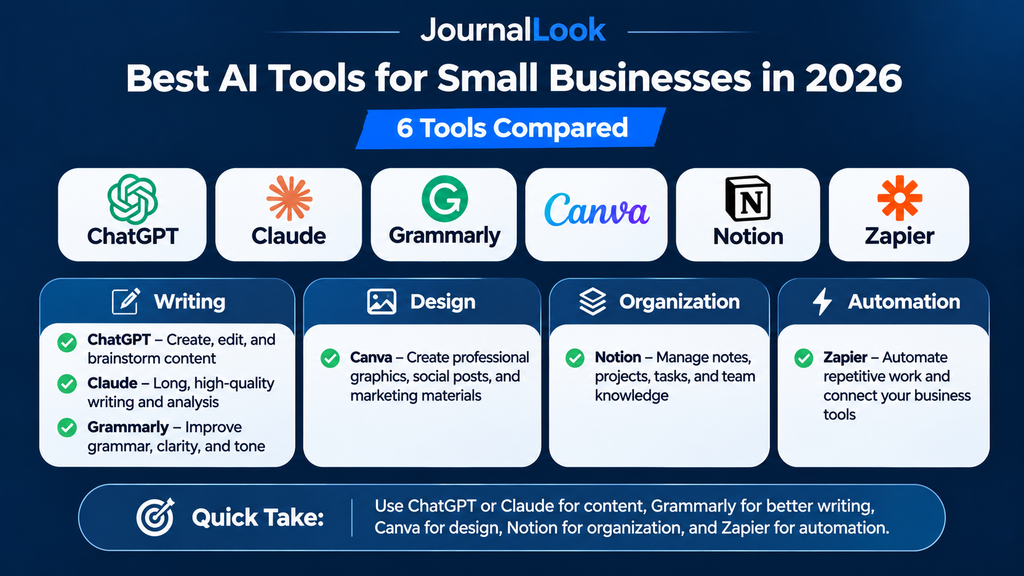
AI Tools for Small Businesses: At-a-Glance Comparison
| Tool | Best for | Free option | Consideration |
|---|---|---|---|
| ChatGPT | Brainstorming, support drafts, research planning | Yes, limited | Verify facts and outputs |
| Claude | Long-form drafting and document discussion | Yes, limited | Usage caps and verification |
| Grammarly | Grammar, tone, business communication | Yes | Advanced tools may be paid |
| Canva | Marketing visuals and presentations | Yes | Premium assets and AI limits |
| Notion | Projects, notes, knowledge base | Yes | AI features vary by plan |
| Zapier | Workflow automation across apps | Yes, limited | Task limits and setup effort |
“Free option” refers to access to a free plan or tier, not unlimited access to every AI feature. Regional availability and plan limits can change.
1. ChatGPT — Best for Everyday business problem-solving
ChatGPT can help a founder brainstorm campaigns, outline customer-facing guides, create draft FAQs, and turn rough notes into organized plans. Its main strength is flexibility: the same assistant can support marketing, operations, and learning.
Practical small-business use cases
- Brainstorm ten customer questions for a product page
- Draft a customer service response for human review
- Turn meeting notes into an action checklist
- Explain unfamiliar business terminology
Limitations to consider
- AI-generated facts and citations may be incorrect
- Never paste confidential customer data without authorization
- Outputs require brand and legal review
JournalLook verdict: Use ChatGPT when you need a versatile starting point rather than a specialized system.
Official product page: ChatGPT — plans and features.
2. Claude — Best for Long-form writing and document analysis
Claude is useful for discussing business documents, revising proposals, and exploring different ways to explain a complex service. Its conversational workflow can help you identify unclear assumptions in your own drafts, though the output should not replace professional review.
Practical small-business use cases
- Review the structure of a proposal
- Identify missing questions in a policy draft
- Summarize documents you are permitted to share
- Suggest clearer language for a customer guide
Limitations to consider
- It can make factual and reasoning mistakes
- Free usage is limited
- Sensitive documents require appropriate handling
JournalLook verdict: Consider Claude if your work involves substantial written material and iterative feedback.
Official product page: Claude — plans and features.
3. Grammarly — Best for Clearer customer communication
Grammarly focuses on spelling, grammar, clarity, and writing assistance. It is a useful finishing layer for emails, support messages, website copy, and proposals, especially for small teams writing in English.
Practical small-business use cases
- Proofread sales emails
- Check clarity in support replies
- Improve sentence structure in proposals
- Review tone before sending sensitive messages
Limitations to consider
- Suggestions can alter intended meaning
- Some advanced features require payment
- It cannot verify the truth of a business claim
JournalLook verdict: Choose Grammarly when the message already exists and you need it to read more clearly.
Official product page: Grammarly — plans and features.
4. Canva — Best for Fast visual marketing
Canva helps small businesses produce social graphics, presentations, posters, and simple marketing assets using templates and design tools. AI-assisted capabilities can speed up parts of the creative process, although entitlements differ by plan.
Practical small-business use cases
- Design a consistent social media series
- Build a pitch deck
- Create promotional flyers
- Make branded presentation slides
Limitations to consider
- Some assets and AI tools require payment
- Templates still need brand review
- Check commercial-use and licensing terms
JournalLook verdict: Canva is a practical choice for businesses that need visuals without a full design team.
Official product page: Canva — plans and features.
5. Notion — Best for Organizing operations and knowledge
Notion brings documents, task lists, and databases into one workspace. A small team can use it to track projects, maintain standard operating procedures, and collect recurring customer questions. AI features may be separate from core free functionality.
Practical small-business use cases
- Create a project tracker
- Document repeatable processes
- Maintain a content calendar
- Build a searchable internal handbook
Limitations to consider
- Too much customization creates overhead
- AI availability varies by plan
- Permissions and data handling matter
JournalLook verdict: Use Notion when your biggest problem is scattered information and unclear ownership.
Official product page: Notion — plans and features.
6. Zapier — Best for Reducing repetitive work
Zapier connects applications and triggers actions between them. A business might route form responses into a task system or send an internal notification when a lead arrives. Some workflows can use AI steps, but automation should be tested carefully before processing real customer data.
Practical small-business use cases
- Send form submissions to a spreadsheet
- Notify a team when a lead arrives
- Create tasks from approved triggers
- Connect existing apps without custom code
Limitations to consider
- Free plans limit usage and functionality
- Incorrect automations can repeat mistakes at scale
- Some integrations and AI steps are paid
JournalLook verdict: Choose Zapier when you can describe a repetitive process with clear inputs and outputs.
Official product page: Zapier — plans and features.
How to Build a Small-Business AI Stack Without Overspending
Start with the bottleneck, not the product. If your team struggles to write professional emails, a writing assistant may help more than automation. If missed handoffs are the problem, a project workspace could deliver more value than another chatbot.
- Step 1: Identify one recurring task that consumes time each week.
- Step 2: Measure how long it currently takes and what errors occur.
- Step 3: Test one free tool on a low-risk example.
- Step 4: Review output quality, privacy, and staff adoption.
- Step 5: Upgrade only when limits are blocking measurable value.
Best Tool by Business Type
Freelancers and consultants: ChatGPT or Claude for outlining proposals, Grammarly for client-facing polish, and Notion for tracking deliverables.
Retail and e-commerce: Canva for promotional visuals, ChatGPT for product-description drafts, and Zapier for carefully tested administrative workflows.
Agencies and creative teams: Canva for reusable branded assets, Notion for shared processes, and a conversational assistant for brainstorming. Keep final creative and factual decisions with your team.
Local service businesses: Grammarly for customer emails, Notion for checklists, and Zapier for simple appointment or lead notifications where the connected apps support them.
Privacy, Accuracy, and Customer Trust
AI tools are not a substitute for legal, tax, financial, or medical advice. Avoid entering customer records, payment details, confidential contracts, or sensitive employee information into unapproved services. Review retention, access controls, and data-processing terms. Have a person approve externally published claims and consequential decisions.
Frequently Asked Questions
What is the best AI tool for a small business?
There is no universal winner. ChatGPT is a flexible general assistant; Canva is more relevant for visual marketing; Zapier is better suited to connecting repeatable workflows.
Can a small business use AI tools for free?
Yes. Each tool in this comparison has a free access option or tier, but features, quotas, and eligibility vary. Some advanced AI functions are paid.
Which AI tool is best for marketing?
Canva is useful for visuals, while ChatGPT or Claude can help brainstorm and draft content. A human should verify all claims and ensure the material matches the brand.
Is Zapier an AI chatbot?
No. Zapier is primarily a workflow automation platform that connects apps. Some workflows can include AI functionality.
Should I buy several subscriptions at once?
Usually not. Test a single high-value workflow, measure results, and add tools only when they solve distinct problems.
Can AI replace employees in a small business?
AI may reduce time spent on specific tasks, but it does not remove the need for human judgment, customer relationships, quality assurance, and accountability.
Final Verdict
The most useful AI stack for a small business is usually smaller than you think. Start with ChatGPT or Claude for flexible assistance, add Grammarly for writing quality or Canva for design, use Notion when coordination becomes difficult, and introduce Zapier once you have a repeatable process worth automating. The goal is better work, not more subscriptions.
Official Sources and Editorial Disclosure
Editorial disclosure: Recommendations are based on publicly described capabilities and practical use-case analysis; no controlled product testing is claimed. Check the official product sites for current prices and plan limits. These links are not represented as affiliate links.